


search

March 4, 2026

Clinical trial sponsors and CROs increasingly ask: ‘How does Pinnacle 21 Enterprise differ from the standard version?’ While Pinnacle 21 Community (the standard, open-source version) remains a valuable validation tool, growing regulatory complexity and multi-study oversight often require a more thorough, submission-ready approach.

Understanding the differences is essential for organizations evaluating validation strategy, regulatory risk, and submission readiness. This blog examines the key differences between Pinnacle 21 Enterprise and the standard Community version, to help you determine which solution best supports your organization’s regulatory and strategic goals.

Why validation strategy matters for regulatory compliance

Regulatory authorities such as the FDA and PMDA expect sponsors to validate datasets against current CDISC standards and agency-specific rules prior to submission. As requirements evolve, validation is no longer a one-time technical step; it’s a lifecycle process embedded in compliance, quality, and inspection readiness.

This raises a common question…

Can Pinnacle 21 help with regulatory compliance in clinical trials? The answer is yes – but the depth of compliance depends on the version used.

Regulatory alignment, submission readiness & validation engines

One of the most important differences between Pinnacle 21 Enterprise and the standard version, known as Community, is how regulatory alignment is performed and measured. This includes how validation engines are maintained, deployed, and governed across teams.

Community

  • Not aligned as promptly with the latest version of the validation engine
  • Local desktop installation and validation
  • Users may run different versions of the validation engine across teams
  • No validation log or history (each validation run generates a new spreadsheet)
  • Manual installation of medical dictionaries such as MeDRA, WHODrug and MED-RT
  • No indication of submission readiness

As a free, open-source desktop tool, Community isn’t promptly updated in line with the latest version of the validation engine.

And because Community is installed locally, version control is governed by individual users. There is no ability to see which version each user is running. As a result, users may inadvertently validate against different versions of the validation engine, creating potential discrepancies – especially in larger organizations.

There is no validation log functionality in Community. That means it’s not possible to compare validation reports or quickly determine that an issue has been resolved.

Enterprise

  • Promptly aligned with the latest version of the validation engine
  • Full validation history (log of historical validations including engines, standards & dictionaries used)
  • Validation report comparisons
  • Superset of the very latest rules across global agencies including the FDA, PMDA and NMPA (including legacy versions)
  • Validation against additional non-CDISC engines, including BIMO
  • Pre-configured medical dictionaries, including MeDRA, WHODrug and MED-RT
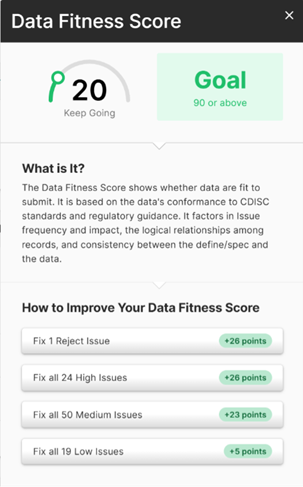
  • ‘Data fitness score’ indicating overall submission compliance
  • Secure, cloud-based, centrally managed environment

Pinnacle 21 Enterprise is maintained in line with the very latest version of the validation engine – whereas Community may fall behind. In addition, Enterprise ensures all users validate within the same controlled environment, using the latest regulator aligned engine.

Enterprise also enables validation against additional engines. For example, you can validate against a BIMO data package, which cannot be done in Community.

The ‘data fitness score’ provides a quantitative measure of dataset compliance, giving sponsors a high-level indicator of submission readiness. Enterprise also includes data package specific guidance on how to increase your data fitness score.

how Pinnacle 21 Enterprise differs from the standard version with a data fitness score

Summary: Pinnacle 21 Community is a good starting point for individual programmers or early-stage studies. Enterprise goes beyond basic validation, providing measurable indicators of regulatory impact, and guidance towards submission readiness.
Issue management and audit trail

Another big difference between Pinnacle 21 Enterprise and the standard version lies in how validation findings are managed and resolved.

Community

  • No issue lifecycle audit trail (issues are not logged in the platform)
  • Issue communication handled outside the platform
  • No issue assignment, ownership or tracking
  • No measure of issue severity or regulatory impact
  • No impact prioritization

Community does not track or manage issues. Once validation is complete, issue management typically moves offline into spreadsheets, shared drives, and email chains. When revalidating, a new spreadsheet is created, without preserving the context of previous comments or resolution steps. This makes it difficult to demonstrate a clear audit trail of resolution history.

Since findings are not categorized by regulatory impact, issue prioritization is a fully manual process in Community.

Enterprise

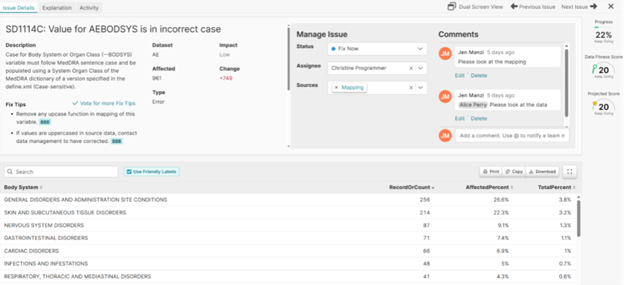
  • Full issue audit trail across the study lifecycle
  • Users assign findings to specific team members
  • Built-in collaboration and commenting
  • Status tracking (open/ in progress/ fixed)
  • Impact classification to prioritize findings (high, medium, low)
  • Reusable ‘fix tips’ with pre-written explanations
  • Automatic marking of resolved issues upon revalidation

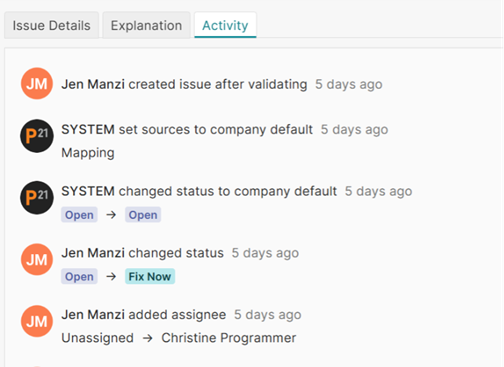
With Enterprise, issues are logged, managed and maintained in the platform. Each issue retains its history, ownership, and status across validation cycles. This creates a clear audit trail and significantly reduces manual coordination.

issue management in Pinnacle 21 Enterprise compared with the standard version

Impact classification guides teams to prioritize findings most likely to affect review outcomes. Enterprise allows organizations to create metadata for each rule ID that fires. Users can set default rule statuses and sources, and add up to 10 fix tips and explanations. None of these functionalities are available in the standard Community version.

fix tips in Pinnacle 21 Enterprise that are not provided in the standard community version

Summary: Issue management is an entirely manual process that is handled outside of Community. Enterprise manages issues through their lifecycle, providing indicators of severity and submission impact.
Define.xml automation and submission documentation

When evaluating the main differences between Pinnacle 21 Enterprise and the standard version (Community), define.xml automation and submission support are often key decision drivers.

Community

  • Manual creation of define.xml
  • No ability to generate the Study Data Reviewer’s Guide (SDRG)

Creating and maintaining define.xml files is a manual process in Community. There is no ability to generate the SDRG.

Enterprise

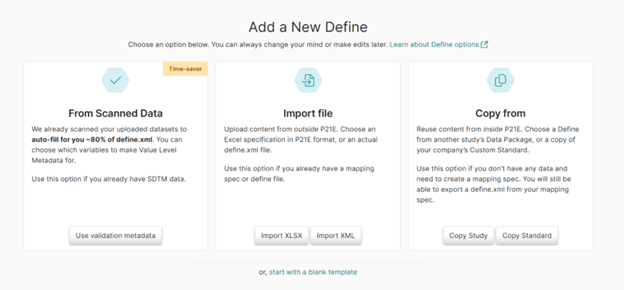
  • Auto-populates around 80% of define.xml, including page numbers, version control, comparisons, and annotated CRF page number extraction
  • Auto-generates the SDRG, including issue summary table

Enterprise saves significant time when it comes to creation of define.xml and the SDRG. It also supports multiple approaches to define.xml creation, allowing teams to tailor the process to their organization’s preferred workflow.

automated generation of define.xml in Pinnacle 21 Enterprise

Summary: The process of creating define.xml is entirely manual in Community, with no ability to produce the SDRG. Enterprise automates define.xml and enables further efficiencies by automating creation of submission deliverables.

Metadata governance and standards control

Pinnacle 21 Enterprise also differs from the standard version, known as Community, in its approach to metadata governance.

Community

  • No centralized standards repository
  • Limited metadata visibility
  • No built-in Controlled Terminology management
  • No organizational rule defaults

Community does not provide centralized oversight of standards, Controlled Terminology, or organizational conventions.

Enterprise

  • Centralized CDISC standards repository
  • Automatically imported Controlled Terminology with NCI codes included
  • Ability to import proprietary standards
  • Configurable rule defaults
  • Pre-written and reusable issue explanations

Enterprise facilitates a governed validation ecosystem where teams can standardize rule handling through pre-written, reusable explanations that attach directly to issues and flow automatically into the Reviewer’s Guide.

Define.xml metadata can be centrally managed and reused across studies, reducing repetitive effort and maintaining consistency across studies.

Summary: Community has no functionality for standardizing or governing study metadata. Enterprise governs the standards and metadata underpinning your validations, enabling structured reuse, greater consistency, and significant time savings across studies.
Portfolio analytics and cross-study oversight

When considering the differences, a defining Enterprise platform capability is cross-study visibility.

Community

  • No analytics dashboards
  • No centralized metrics

Community does not provide performance analytics or cross-study insights.

Enterprise

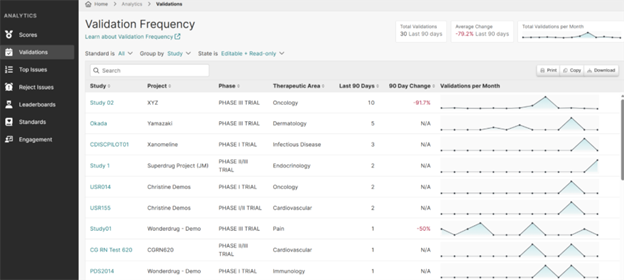
  • Portfolio level analytics with dashboards
  • Reject level issue monitoring
  • Recurring issue pattern identification
  • Standards adoption tracking

Enterprise delivers comprehensive portfolio level analytics, allowing you to monitor projected data fitness scores, validation frequency, top and reject-level issues, user activity leaderboards, standards adoption, and data package trends.

dashboard reporting in Pinnacle 21 Enterprise

These insights enable cross-study oversight – allowing organizations to proactively mitigate risks, drive continuous quality improvement, and elevate data integrity.

Summary: Community offers no metrics for risk or quality oversight. Enterprise has a centralized dashboard with robust cross-study visibility and actionable portfolio-level insights.

Technical support and collaboration

Another way Pinnacle 21 Enterprise differs from the standard version lies in support offerings.

Community

  • Forum-based support only
  • No dedicated technical support
  • External collaboration

Technical support is limited to the Community ‘forum’, with user-generated discussions around specific topics. This communication takes place outside of the Community tool and is done manually.

Enterprise

  • Help center with structured training modules, including videos & quizzes
  • Dedicated technical support team
  • In-stream platform collaboration

Enterprise users have access to a dedicated technical support team. The integrated help center provides detailed training documentation and step-by-step videos. And in-platform communication enables direct collaboration with Pinnacle 21 experts for timely issue resolution.

Summary: Community offers exchange of user views and comments through an external forum. Enterprise integrates full technical support and collaboration within the platform.

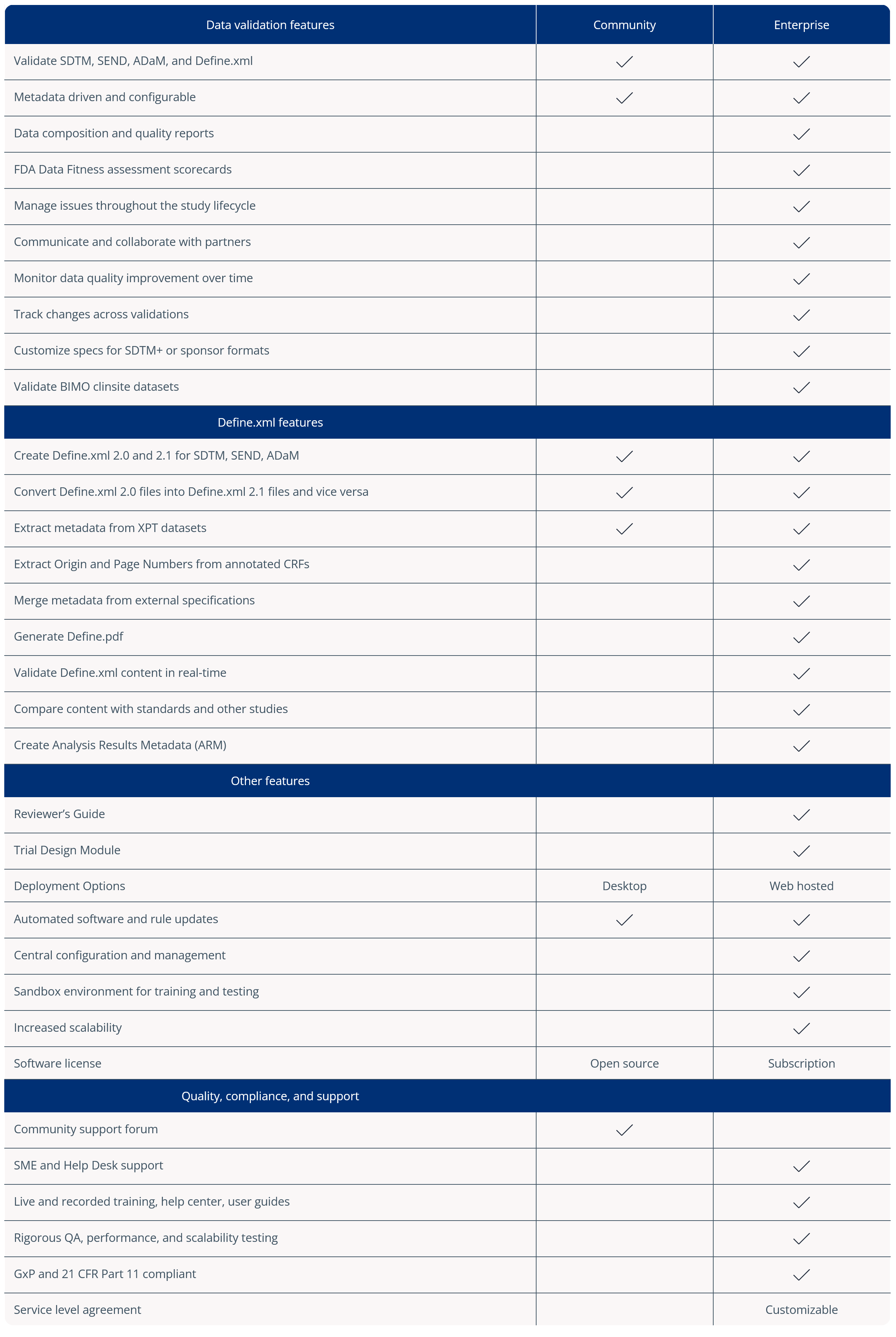
Refer to this table for a feature-by-feature comparison of the differences between Pinnacle 21 Enterprise and the standard version, known as Community.

Summary and next steps

Having examined the key differences in detail, to summarize the question, ‘How does Pinnacle 21 Enterprise differ from the standard version?’, at a high level:

  • Pinnacle 21 Community (standard version) performs basic validation, locally.
  • Pinnacle 21 Enterprise goes beyond basic validation to manage compliance strategically and collaboratively at scale, delivering measurable insights into submission readiness.

Community plays an important role in CDISC conformance checking, particularly for early-stage validation or smaller teams.

Enterprise, however, transforms validation into an integrated compliance framework. It centralizes validation engines, automates Define.xml and SDRG generation, records issue lifecycles, quantifies submission readiness, and delivers portfolio-level analytics across studies.

For organizations preparing complex, global submissions, or managing multiple concurrent studies, that difference is transformative, rather than incremental.

Author

Jen Manzi

Jen Manzi

Subject Matter Expert and User Advocate, Pinnacle 21 by Certara

Jen Manzi is a Subject Matter Expert and User Advocate at Pinnacle 21. She has over 20 years of Pharma/Life Sciences industry experience in Clinical Trials and Safety Data Management. Jen has held various roles within these areas, including eCRF Programmer, SDTM Delivery Lead, Product Owner and Programmer of Batch Processes, Vendor Relationship Manager, Program and Process Improvement Manager, and Validation Lead.

Make an enquiry about Pinnacle 21 Enterprise

Pinnacle 21 Enterprise builds on Community’s core validation capabilities with:

Advanced validation capabilities & alignment with latest validation engines
Enterprise-level governance
Issue tracking, prioritization and submission readiness guidance
Centralized collaboration and oversight

Make an inquiry to learn how your organization can benefit from reduced risk, increased quality, and guided submission readiness with Pinnacle 21 Enterprise.


FAQs

What is OpenCDISC Validator?

OpenCDISC Validator is the original name of the software widely known as Pinnacle 21 Community. It is a free, open-source desktop tool (installed locally) used to validate clinical trial data against CDISC SDTM, ADaM, and SEND.

Can Pinnacle 21 help with regulatory compliance in clinical trials?

Yes. Pinnacle 21 helps organizations validate clinical datasets against CDISC standards and regulatory rules, providing basic level validation capabilities.

What is Pinnacle 21 Enterprise?

Pinnacle 21 Enterprise is the commercial, cloud-based version of Pinnacle 21. It is hosted in a secure, cloud-based, centrally managed environment. The platform is designed for organizations managing multiple studies and regulatory submissions. It provides advanced validation capabilities, centralized oversight, collaboration tools, and enterprise-level governance features that go beyond the functionality of the free Community version.

What are the main features of Pinnacle 21 for Enterprise use?

Pinnacle 21 Enterprise offers centralized data validation, configurable validation rules, role-based access controls, audit trails, workflow management, and integration with clinical data systems. It also provides regulatory rule updates, reporting dashboards, and collaboration features to support teams across studies and submission cycles.

What is the difference between the free version of P21 Community and the paid version of P21 Enterprise?

This blog thoroughly addresses the frequently asked question, ‘how does Pinnacle 21 Enterprise differ from the standard version.’ The standard version, known as Pinnacle 21 Community, is a free, desktop-based validation tool primarily for individual users. Pinnacle 21 Enterprise is a paid, cloud-based platform built for organizations. Enterprise includes advanced governance, collaboration, automation, security controls, and centralized study management features that are not available in the Community version.