



Products

Certara offers predictive science and informatics solutions that enable cross-disciplinary and translational approaches to drug development.

PK/PD Modeling and Simulation

Phoenix® WinNonlin®

Most Used Industry Standard Software for PK/PD Modeling and Non-Compartmental Analysis (NCA)

Phoenix WinNonlin has long been the industry standard for PK/PD modeling and NCA, and is used by more than 4,000 researchers and over 2,000 institutions around the world.

Phoenix WinNonlin streamlines critical drug development analyses with reusable templates and high-quality output, enabling more impactful quantitative decision making.

Phoenix WinNonlin provides an intuitive interface for data management, plotting, noncompartmental analysis, individual compartmental PK/PD  modeling, bioequivalence tests, table creation and other PK/PD work.

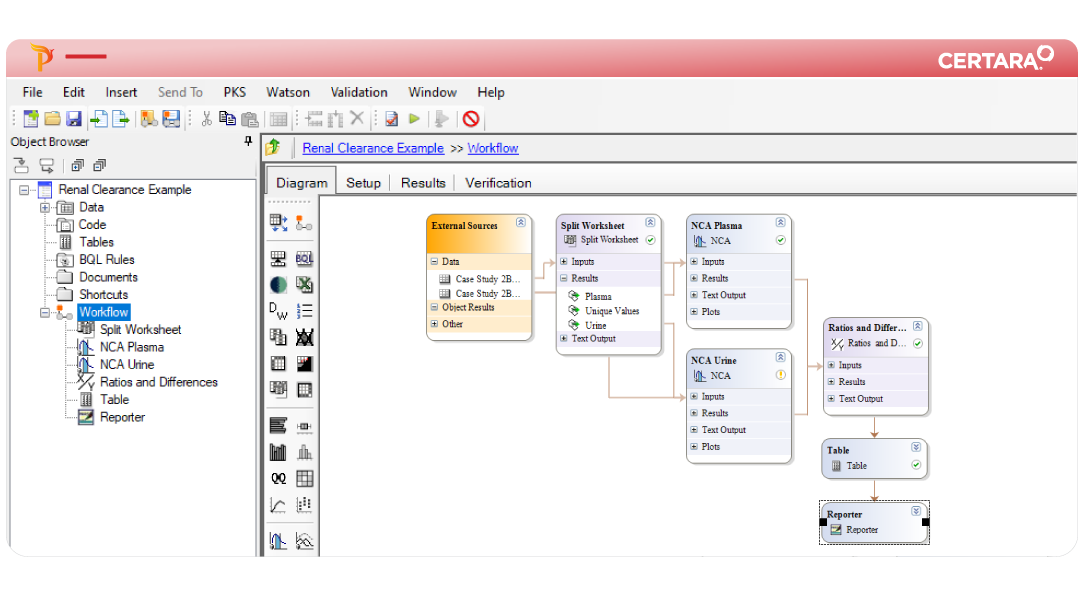
The work performed can be visualized in a diagram where dependencies between steps are highlighted.  Multiple analyses can be re-run with a single click for new or updated data sets.  The workflow structure organizes work and makes it easy to look at any analysis step by clicking on it.

Key Benefits

Comprehensive Analysis Environment

  • Easy to use, robust modeling tools to analyze most PK and PK/PD studies.
  • Manage all analysis steps and documentation within a single file, including plots and tables.

Efficient Workflow Management

  • Create, reuse, and share analyses as stored workflows.
  • Easily process, visualize, and tabulate data.
  • Organize work with powerful data management and tabulation tools.
  • Create reusable templates from single steps or full analysis workflows.
  • Rename and organize analysis steps where each input/output relationship can be visualized in a colorful, easy-to-undertstand diagram.

High Quality Outputs

  • Generate high-quality graphs, tables, and figures allowing for integrated communication of analysis results.

Easy to Learn and Share

  • Minimize the amount of time spent learning the software 
  • Promote collaboration through easily transferable project files, workflows, and templates.

Enables Compliance

Supports Validated Environments

  • validation suite for Phoenix WinNonlin is available to automate onsite validation.

System Requirements

Phoenix WinNonlin is supported for both 32-bit and 64-bit versions of Windows XP SP3, Windows 2003, Windows 7 SP1, Windows 2008 Server R2.

Minimum Hardware Requirements:

  • Processor:  Intel Core 2 Duo 2.0 Ghz, or a CPU of EQUIVALENT processing power

  • RAM:  2 gigabytes RAM

  • Hard drive space:  300 megabytes free

Click here for detailed system requirements, including international language support.

Phoenix WinNonlin Features Tour

Intuitive, guided interface enables PK/PD modeling and NCA

Workflow Diagram

The diagram window in Phoenix WinNonlin provides the user with a quick glance to see the steps performed in each workflow. Each of the objects in the diagram can be expanded for details. For example, in the diagram above, the NCA object Inputs and Results are expanded. The input data for the main panel comes from external sources (Data Folder under the project) and the dosing information comes from a data step (Split worksheet). The NCA results “Final Parameters Pivoted “are then linked as inputs to a Table and a Box Plot object.

Dependency Tracking

Phoenix WinNonlin tracks all of the dependencies between inputs, outputs, and object settings. An example is illustrated above, where double clicking on a point in any Phoenix WinNonlin graph automatically opens the input worksheet showing the origin of the plotted data in question. This allows for a speedy review of outliers or data of interest.

Graphics

Phoenix WinNonlin has an intuitive user interface to create a wide variety of graph types with many format options. When objects are copied or exported as templates, the formats remain and can be recreated with different datasets.

Tables

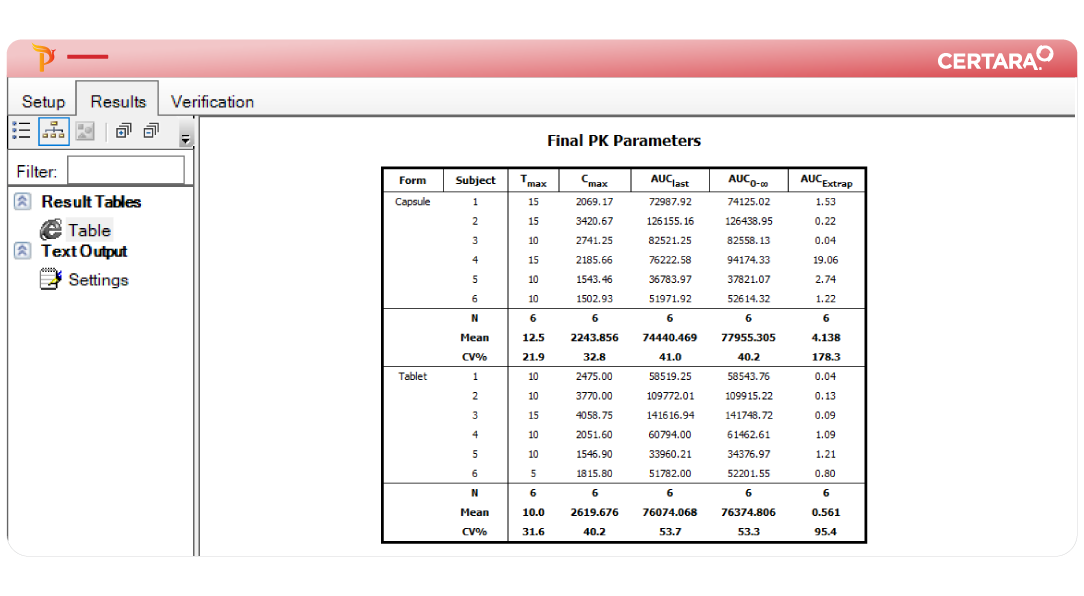
The Phoenix WinNonlin Table object provides several table templates to display data. In some templates, summary statistics can be requested and the summarization will take place at time of table creation (example above). The precision of the data being created can be selected as either significant digits or decimals. The column headers and units can be replaced by any desired text with superscript, subscripts and symbols. Phoenix results can be exported to Word or saved as several common formats depending on its type. The whole analysis is saved as a single phoenix project file (*.phxproj).

Non-compartmental Analysis

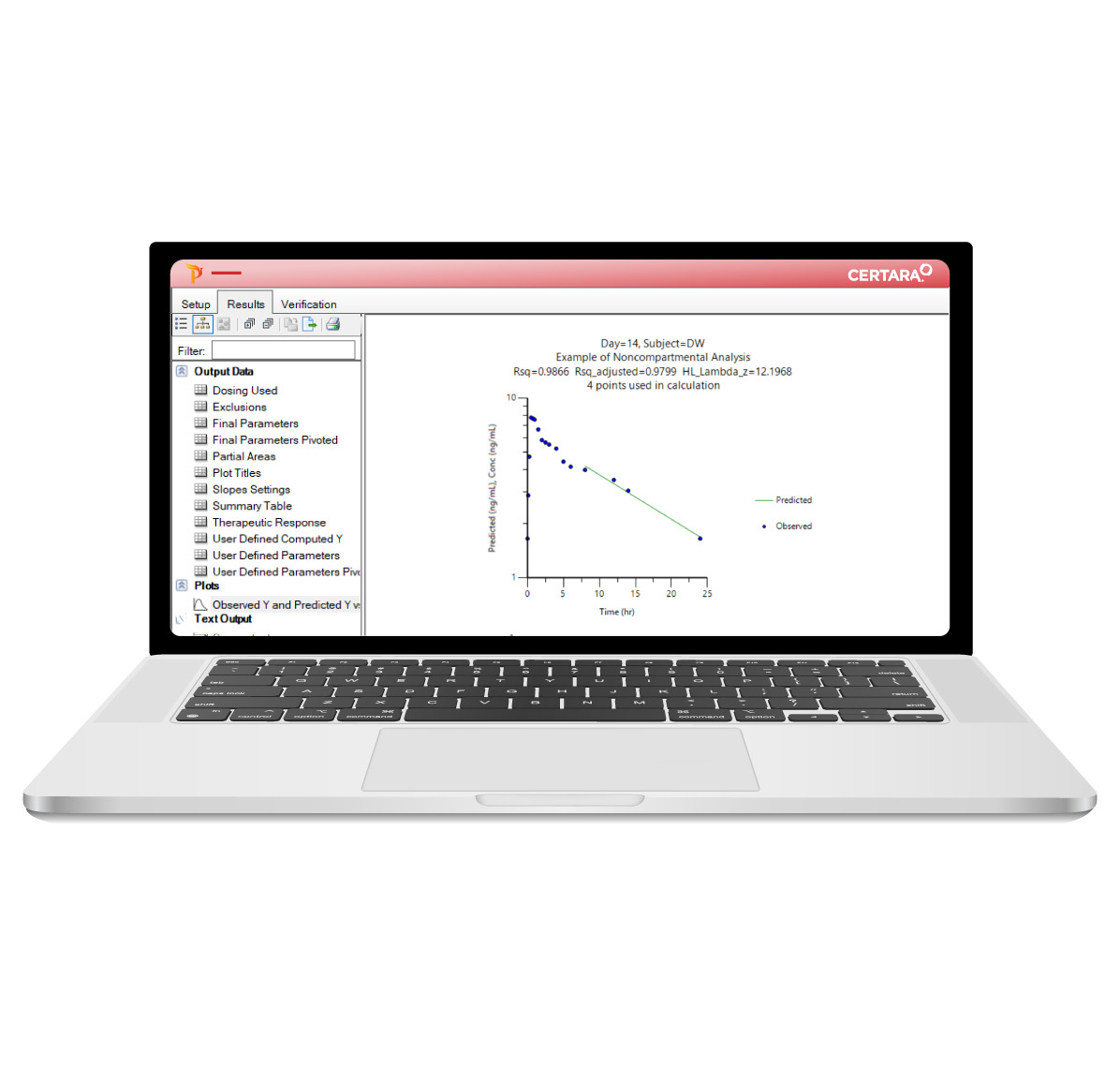
The Phoenix WinNonlin NCA object provides an interactive way to select the apparent terminal phase of profiles, as well as excluding (if appropriate) any point from the regression. The user can manually select the points in the terminal phase (Method=TimeRange), or let the program select them with the BestFit method. The NCA object allows the user to convert units for the final parameters as well as output the desired parameter names. NCA models for plasma, urine, and effect are available as well as other options to calculate additional parameters for partial and therapeutic areas.

Videos

2.5 minute introduction to Phoenix WinNonlin for

Webinars

Explore some of our recent webinars

This webinar presented and demonstrated the new features of Phoenix 1.3. (recorded webcast)

Bookmark and Share

Resource Library

Search Our Archives